Brasa: Focus Timer uses an ember mechanic to guide Pomodoro work
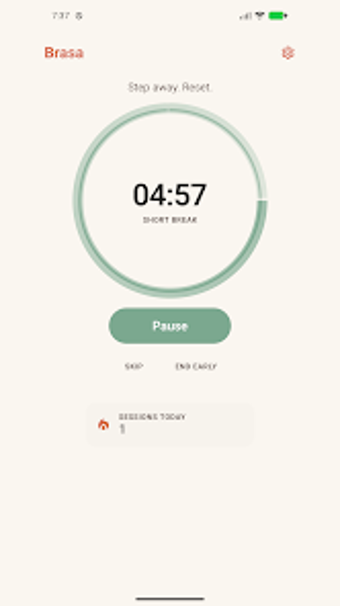
Splits focus into customizable Pomodoro intervals, ambient audio, and a visual ember that grows as sessions accumulate. Brasa: Focus Timer, from Done Spaghetti, pairs a minimalist timer interface with background sounds and session history to support deep work. The app targets students, remote workers, and professionals who prefer a distraction-free, motivational cue over complex task lists. It highlights progress through a gamified fire image while keeping controls and settings deliberately spare.
The ember mechanic turns concentration into a visible, persistent signal
The app uses a fire metaphor that evolves as you complete focus intervals, a design choice described as a gamified ember that rewards consistency. This visualisation makes focus measurable in a single glance and replaces numeric streaks with a changing image, which suits users who respond to simple, persistent feedback rather than badges or points.
Customizable Pomodoro timing and ambient audio support practical session workflows
The timer lets users adjust focus, short break, and long break durations, so you can match the schedule to study blocks or concentrated work periods. Built-in ambient sounds and white noise play during sessions, which helps mask distractions while the timer runs. The app also tracks completed sessions so you can review how many intervals you finished across a given period.
The minimalist interface reduces in-app distractions but narrows task management
The interface emphasizes a distraction-free workspace, intentionally keeping controls and visual elements to a minimum. That design lowers cognitive clutter during focus periods, though it also means the app does not surface complex in-app task management features; the experience stays centered on timing and the fire visual rather than project or task hierarchies.
Android-only availability and analytics fit solo productivity routines
Brasa runs on Android devices and provides a statistics section with session history and productivity graphs, which supports solo users tracking personal patterns. The platform focus makes the app a straightforward companion on a single device and its analytics target individual habit tracking rather than team reporting or cross-device syncing.
Brasa suits individuals who want a simple, visual nudge to sustain deep work
Brasa fits students and solo professionals who prefer a minimalist Pomodoro companion with ambient sound and session analytics. Its ember visual and adjustable timing support disciplined individual routines. Those needing task management embedded in the timer or cross-device continuity should expect the app to remain a focused, single-device aid rather than a full-scale productivity platform.